The Roster

New Client Intake

Forms and missing documents

Included in every plan. Solo from $89/mo plus $99 setup. Extra roles $39/mo.

Plan
Every plan
Setup
A few basic questions
Approval
Nothing sends without your OK
Works in
Email today; texting on request

See it at work

Examples. Names and numbers are made up.

Sends forms, asks for what is missing
Knows what's missing
Matches come to you (on request)
Packets wait for your OK (on request)

Sends your new-client form and what to bring, reads what clients send back, and asks for whatever is missing, every message held for your OK. Checking new names against your conflict list is on request.

more

What it handles

  • New-client forms and questionnaires
  • What-to-bring lists
  • Collecting documents and asking for what's missing
  • Labeling and filing what comes in (on request)
  • Checking names against your conflict or eligibility list (on request)
  • Your Monday report: welcomes and requests sent, what still waits

What waits for your OK

  • Every welcome and every request for documents
  • Engagement letters and welcome packets (on request)
  • Name matches and applicants outside your rules (on request)

What it never does

  • Promise a price, date or time you haven't set
  • Spend your money or agree to a charge
  • Pretend to be a person. If asked, it says it's an AI assistant
  • Guess. When it isn't sure, it hands the question to you
  • Give legal, tax or insurance advice, or tell anyone they're approved

How businesses use it

Law office

Conflict checks happen after the first meeting.

Sends the intake form before the consult, so you can run your conflict check before you approve the welcome.

Property management

Applications arrive missing pay stubs or ID.

Asks for the exact missing item by name.

Insurance agency

Quotes stall waiting on policy pages.

Collects policy pages and driver details before you start quoting.

Tax prep office

Client documents trickle in all spring.

Sends a checklist and asks for what is still missing. Filing and reminders are on request.

How it works

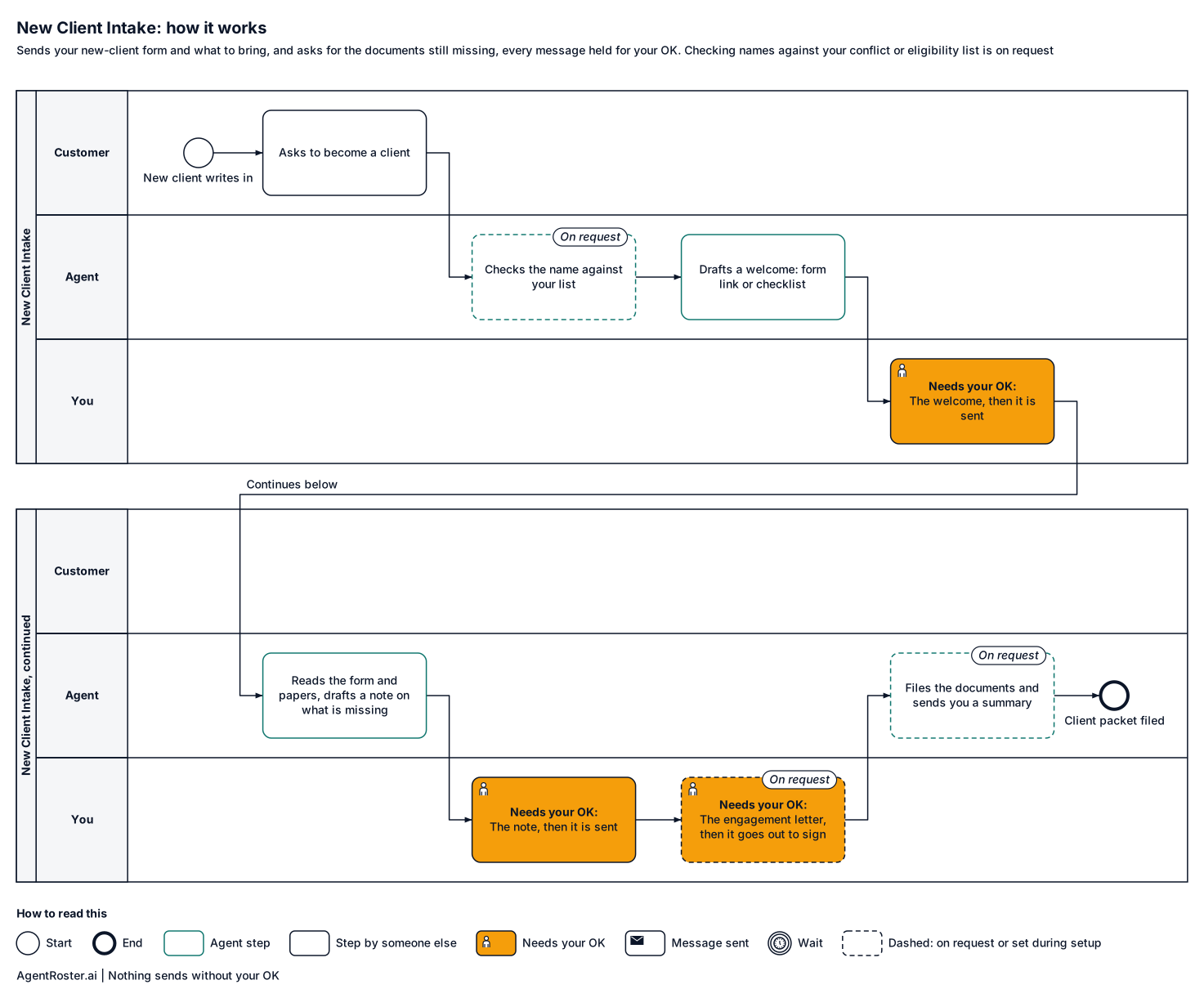
Every step, who does it, and where it waits for your OK. Nothing sends without your OK.
See the full workflow
How it works, step by stepTap to enlarge
Diagram of how the New Client Intake works, step by step. 1, the customer: asks to become a client; 2, the agent: checks the name against your list (on request); 3, the agent: drafts welcome: form link or checklist; 4, you: approve, edit or reject the welcome; 5, the agent: sends the welcome by email or chat; 6, the customer: sends the form and documents; 7, the agent: drafts a reply asking for what is missing; 8, you: approve, edit or reject the request; 9, the agent: sends the request in the same thread; 10, you: approve the engagement letter or packet (on request); 11, the agent: sends the approved letter for signature (on request); 12, the agent: files documents, sends you a summary (on request). Nothing sends without your OK.
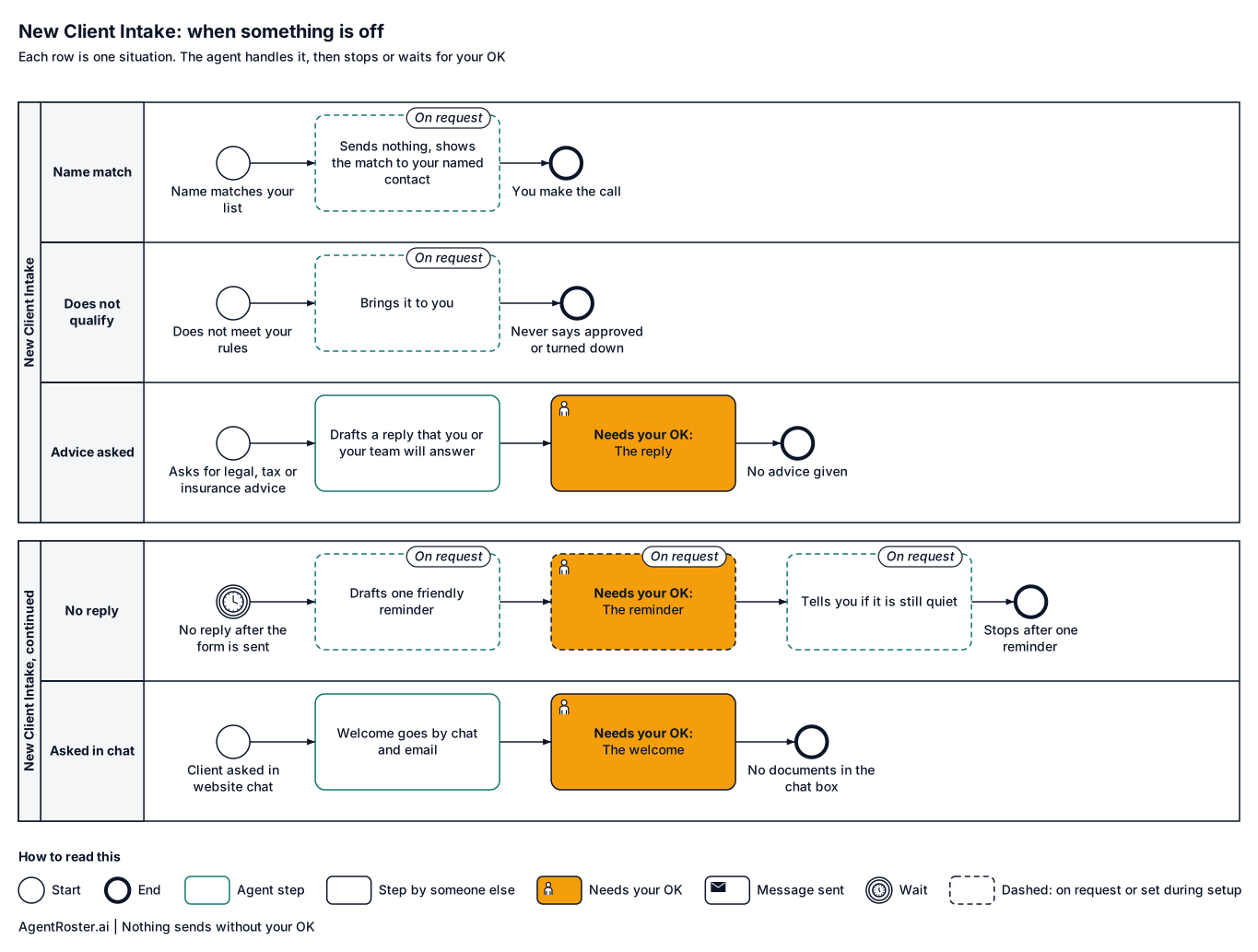
When something is offTap to enlarge
Diagram of what the New Client Intake does when something is off. Name matches your list (on request): sends nothing and books nothing. Applicant does not meet your rules (on request): brings it to you. Client asks for legal, tax or insurance advice: drafts a reply that you or your team will answer, held for your OK. No reply after the form is sent (on request): drafts one friendly reminder for your OK, then tells you. The client asked in website chat: the chat box asks for their email, and the welcome also goes there with your business email for the form and documents.

What you'll provide

Everything it needs to do the job. You add it during setup.

Information

Facts about your business.

  • Your intake form as a web linkRequired

    For example a Google Form, Jotform or your practice software's form. No web form? The welcome lists the documents to send by email reply, and you hand any paper form over at the visit.

    Takes about 10 minutes

  • The documents you need from each clientRequired

    So it asks for exactly what's missing.

    Takes about 10 minutes

  • Your conflict or eligibility listOn request

    Checking new names against it is on request.

Access

Accounts it connects to.

  • Your business email (Gmail or Google Workspace)Required

    So messages come from your business. It gets its own seat, or you invite it.

    Takes about 5 minutes

  • A text line for clientsOn request

    Texting is on request today. If you want it, it gets its own line and you keep your number.

  • Where you keep client filesOn request

    For example, a shared Google Drive folder or your practice software.

Decisions

Your rules. Email us a change any time and we make it.

  • Who reviews name matchesOn request

    Needed once name checks are set up.

  • What always needs your OKRequired

    Every message waits for your OK.

    Takes about 2 minutes

You never send passwords by email or chat. You enter any login your roles need on a secure page we email you. It goes straight to your own private setup; we never see it. Each role gets its own work account, with its own email and calendar seat, or you invite it the way you'd invite a new employee. You can remove it any time. Texting is on request: if you add it, you keep your phone number and forward texts to its line.

After you hire

  1. 1Answer a few basic questions about how the job is done
  2. 2You add the items above during setup
  3. 3It starts in shadow mode: it drafts, you watch
  4. 4It goes live with your OK

Information

Provider
AgentRoster.AI
Category
Customers
Plan
Included in every plan. Solo from $89/mo plus $99 setup. Extra roles $39/mo.
Setup
Answer a few basic questions about how the job is done. One-time setup fee $99 to $299 by plan.
Language
English
Works in
Email today; texting on request
Works with
Gmail
Approval
Nothing sends without your OK
Support
Email hello@agentroster.ai

Your data

  • Kept separate from every other customer's.
  • Never sold. Never used to train AI.
  • Stored in the United States.
  • Deleted within 30 days if you cancel.

Details in our privacy policy and provider list.

You might also hire

Questions

Does it replace my conflict check?

No. Today you run your own conflict check before you tap send on each welcome. Checking names against your list is on request, and even then every match comes to you and you make the call.

What happens to client files?

Documents clients email to it are kept for 7 years unless you pick another time during setup, then deleted. To delete a client's documents sooner, email "delete documents for" and their name from your own address. Your data is never sold and never used to train AI.

Will clients know it's AI?

It writes in your office's name and never claims to be a person. If asked, it says it's an AI assistant that handles intake.

Your next hire doesn't need a desk.

Founding rates for the first 50 businesses.