The Roster

Office Manager

One brief each morning

Included in every plan. Solo from $89/mo plus $99 setup. Extra roles $39/mo.

Plan
Every plan
Setup
A few basic questions
Approval
Never messages customers
Works in
Email today

See it at work

Examples. Names and numbers are made up.

One brief, every morning
Puts your OK at the top
Keeps handoffs moving
Ask what happened

Hands each customer message to the role on your roster that owns it, and sends you one short brief each morning: what needs your OK, today's calendar, what is overdue and what got done. It never messages customers. It works for you and your roster.

more

What it handles

  • One morning brief by email
  • What needs your OK, at the top
  • Hands each message to the right role
  • Spacing out messages so customers aren't flooded
  • A weekly report every Monday; end-of-day recaps on request
  • Answers to "what happened with the Garcia job?", by email

What waits for your OK

  • Pausing or turning on an agent, only when you ask from your own email
  • Changes to who handles what, only when you ask from your own email

What it never does

  • Promise a price, date or time you haven't set
  • Spend your money or agree to a charge
  • Pretend to be a person. If asked, it says it's an AI assistant
  • Guess. When it isn't sure, it hands the question to you
  • Message your customers

How businesses use it

Property management

Repairs, leasing and owner questions live in five places.

Puts it all in one morning read, with what needs you first.

Trades with a small office

You don't know what's waiting before the trucks roll.

Sends a brief at the time you pick: booked, quoted and waiting on you.

Insurance agency

Renewals and client messages compete for your time.

Ranks what's waiting so the urgent ones come first.

How it works

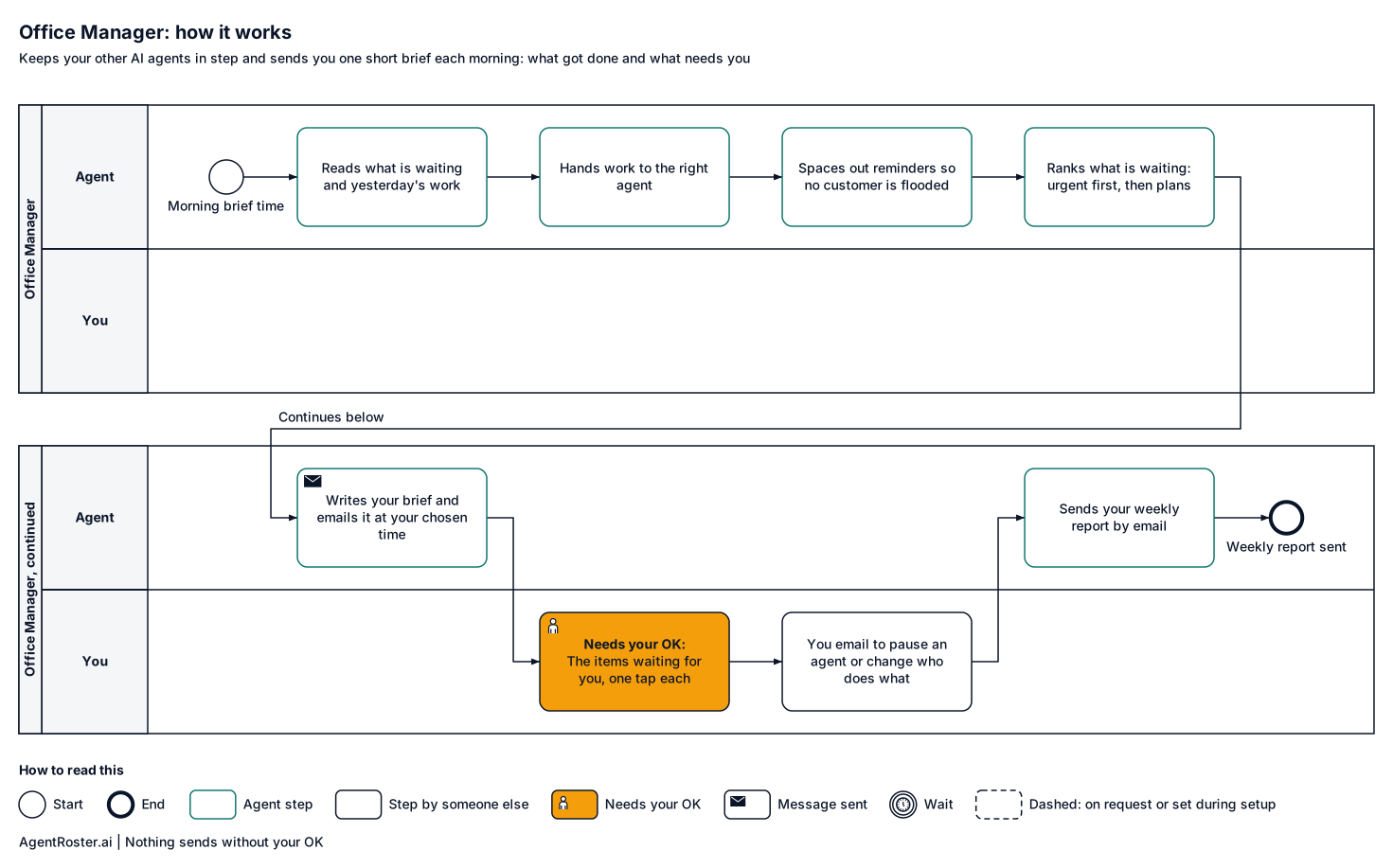
Every step, who does it, and where it waits for your OK. Nothing sends without your OK.
See the full workflow
How it works, step by stepTap to enlarge
Diagram of how the Office Manager works, step by step. 1, the agent: reads what is waiting and yesterday's work; 2, the agent: hands work to the right agent; 3, the agent: spaces out reminders so no customer is flooded; 4, the agent: ranks what is waiting: urgent first, then plans; 5, the agent: writes the brief: needs you first, then the day; 6, your tools: brief emailed to you at your chosen time; 7, you: the items waiting for you, one tap each; 8, you: you email to pause an agent or change who does what; 9, the agent: sends your weekly report by email. Nothing sends without your OK.
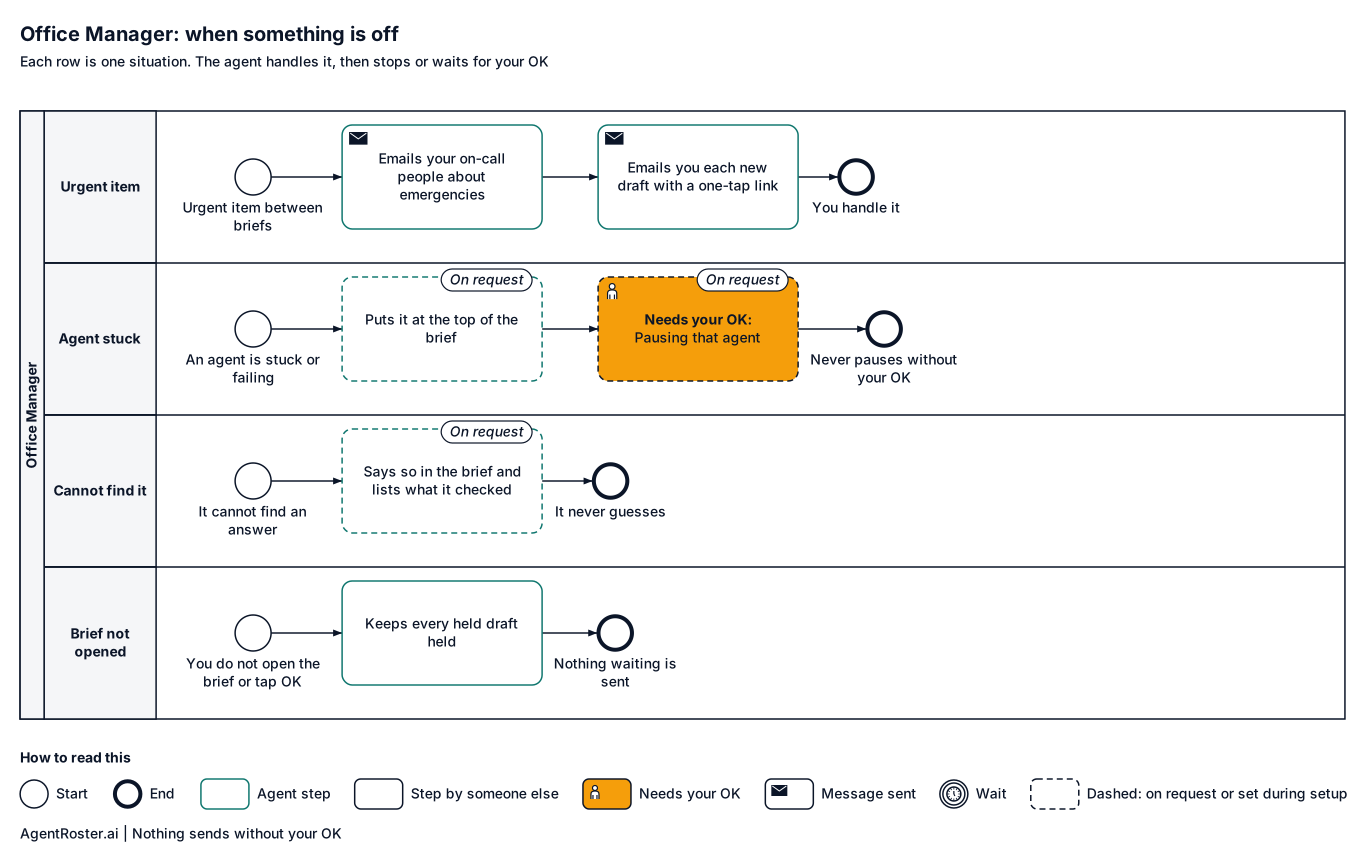
When something is offTap to enlarge
Diagram of what the Office Manager does when something is off. Urgent item between briefs: emergencies are emailed to your on-call people right away. An agent is stuck or failing (on request): puts it at the top of the brief and asks whether to pause it. It cannot find an answer (on request): says so in the brief and lists what it checked. You do not open the brief or tap OK: nothing waiting is sent.

What you'll provide

Everything it needs to do the job. You add it during setup.

Information

Facts about your business.

  • Your roster and who handles whatRequired

    So handoffs go to the right agent. You add it during setup.

Access

Accounts it connects to.

  • Your business email (Gmail or Google Workspace)Required

    Where your morning brief arrives.

    Takes about 2 minutes

Decisions

Your rules. Email us a change any time and we make it.

  • What time you want your briefRequired

    So it is waiting when you start your day.

    Takes about 1 minute

  • What counts as urgentRequired

    Urgent items lead the brief.

    Takes about 5 minutes

  • When a quote or invoice counts as overdueRequired

    So overdue items show in your brief.

    Takes about 2 minutes

  • How far apart messages to one customer go outOptional

    Two hours unless you pick another gap.

    Takes about 1 minute

You never send passwords by email or chat. You enter any login your roles need on a secure page we email you. It goes straight to your own private setup; we never see it. Each role gets its own work account, with its own email and calendar seat, or you invite it the way you'd invite a new employee. You can remove it any time.

After you hire

  1. 1Answer a few basic questions about how the job is done
  2. 2You add the items above during setup
  3. 3It starts in shadow mode: it drafts, you watch
  4. 4It goes live with your OK

Information

Provider
AgentRoster.AI
Category
Office
Plan
Included in every plan. Solo from $89/mo plus $99 setup. Extra roles $39/mo.
Setup
Answer a few basic questions about how the job is done. One-time setup fee $99 to $299 by plan.
Language
English
Works in
Email today
Works with
Gmail
Approval
Never messages customers
Support
Email hello@agentroster.ai

Your data

  • Kept separate from every other customer's.
  • Never sold. Never used to train AI.
  • Stored in the United States.
  • Deleted within 30 days if you cancel.

Details in our privacy policy and provider list.

You might also hire

Questions

Do I need it with only one agent?

Probably not. It earns its place with two or more. With one agent, the weekly report covers it.

How does the brief arrive?

By email, at the time you choose. Getting it by text is on request.

Can I pause an agent?

Yes. Email "pause the Sales Rep" from your own address and you get a confirmation straight back. While it is paused, its incoming mail is kept and listed in your brief, and nothing is drafted. Email "resume the Sales Rep" to restart it; the kept mail is then drafted and still waits for your OK.

What if it misses something?

Every message, draft and decision is logged, so nothing is hidden. Email "what happened with the Garcia job?" for a plain answer, and the Monday report lists what still waits. Tell us what should have been in the brief.

Your next hire doesn't need a desk.

Founding rates for the first 50 businesses.