The Roster

Dispatcher

Right crew, every job

Included in every plan. Solo from $89/mo plus $99 setup. Extra roles $39/mo.

Plan
Every plan
Setup
A few basic questions
Approval
Schedule changes need your OK
Works in
Email and calendar today; texting on request

See it at work

Examples. Names and numbers are made up.

Right job, right crew
Day-before reminder
A job runs long
Each crew knows its day

Assigns booked jobs to the right tech or crew by your rules, holds tomorrow's plan for one tap each evening, and emails each crew its day. When a crew emails that a job is running long, it proposes a new plan and drafts a heads-up for each customer whose time moves. Every change waits for your OK.

more

What it handles

  • Assigning booked jobs by your rules
  • Jobs no crew fits, flagged for you with the reason
  • Matching jobs to skills, like gas or electrical
  • Day-before reminders and running-late heads-ups for customers, by email, each after your OK
  • Running-late emails from your crew
  • Reshuffling the rest of the day
  • Each crew's jobs and addresses, by email
  • Texting crews and customers from its own line: on request

What waits for your OK

  • Tomorrow's plan, one tap each evening. Move any job first, on your phone or by email
  • Every change to the schedule
  • Each customer heads-up when a time moves

What it never does

  • Promise a price, date or time you haven't set
  • Spend your money or agree to a charge
  • Pretend to be a person. If asked, it says it's an AI assistant
  • Guess. When it isn't sure, it hands the question to you
  • Give a customer a new time before you approve the change

How businesses use it

Plumbing with several trucks

The morning starts with an hour on the phone.

Assigns the day's jobs by your rules and sends each tech the list.

Cleaning company

Customers ask when the crew will show up.

Sends each customer a day-before reminder and a heads-up when a crew runs late, each once you OK it.

Property management

Maintenance staff bounce between buildings.

Groups each person's jobs by area and emails them the day in order. Route maps and drive times are on request.

How it works

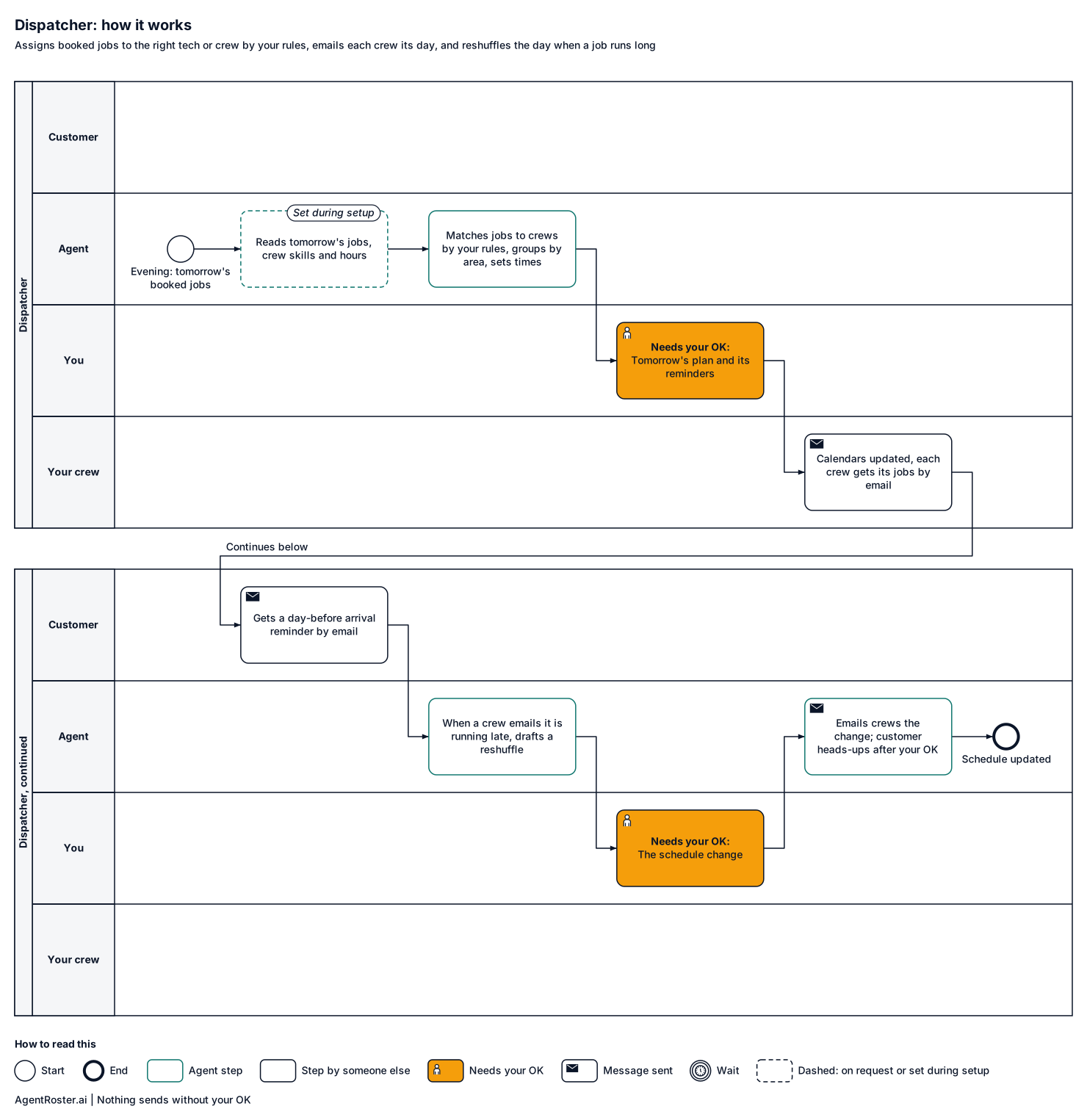
Every step, who does it, and where it waits for your OK. Nothing sends without your OK.
See the full workflow
How it works, step by stepTap to enlarge
Diagram of how the Dispatcher works, step by step. 1, your tools: reads tomorrow's jobs, including ones you add (set during setup); 2, the agent: knows crew skills, hours and job lengths; 3, the agent: matches each job to a crew by skill, hours and your rules; 4, the agent: groups each crew's jobs by area and sets the times; 5, you: approve tomorrow's plan and its day-before reminders; 6, your tools: approved changes written to the crew calendars; 7, your crew: each crew gets its jobs and addresses by email; 8, the customer: gets a day-before arrival reminder by email; 9, your crew: crew emails: running 40 minutes late; 10, the agent: drafts a reshuffle and new windows; 11, you: approve schedule change; 12, the agent: emails crews the change; customer heads-ups after your OK. Nothing sends without your OK.
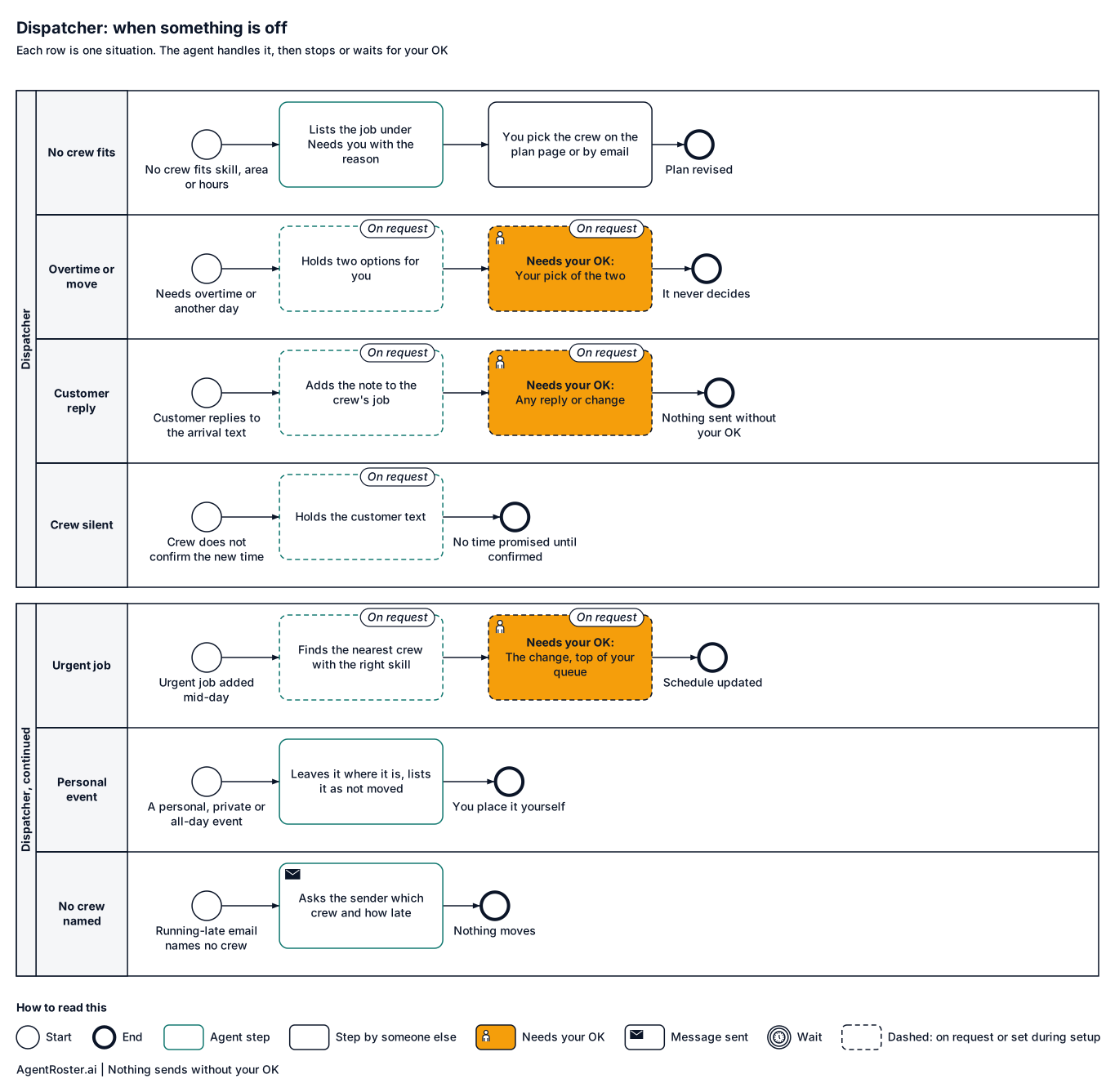
When something is offTap to enlarge
Diagram of what the Dispatcher does when something is off. No crew fits the job's skill, area or hours: leaves the job unplaced and lists it under 'Needs you' with the reason, in the plan and in your morning brief, and asks which crew should take it. A change needs overtime, or moving a customer to another day (on request): never decides. Customer replies to the arrival text (not home, gate code, wants another day) (on request): adds the note to the crew's job and holds any reply or change for your OK. Crew does not confirm the new time (on request): holds the customer text. Urgent job added mid-day (on request): finds the nearest crew with the right skill and holds the change for your OK at the top of your queue. A personal, private or all-day event on your calendar: leaves it where it is and lists it in the plan as not moved. A running-late email does not say which crew: replies to the sender with one question: which crew, and how many minutes.

What you'll provide

Everything it needs to do the job. You add it during setup.

Information

Facts about your business.

  • Your crew list: names, emails, skills and working hoursRequired

    So it matches each job to the right person and emails each crew its day.

    Takes about 10 minutes

  • Your rules for who gets what jobRequired

    For example, only Mike does gas lines, Jess covers the north side.

    Takes about 10 minutes

  • Your service area and crew hoursRequired

    So each crew's day is grouped by area and fits its hours.

    Takes about 5 minutes

Access

Accounts it connects to.

  • Your shared calendar (Google Calendar)Required

    Where the jobs it books live. Jobs you add yourself stay where you put them. You share it during setup.

  • A text line for customers and crewsOn request

    Texting is on request today. If you want it, it gets its own line and you keep your number.

  • Your job software (Jobber, Housecall Pro and others)On request

    If you book jobs there instead of a shared calendar.

Decisions

Your rules. Email us a change any time and we make it.

  • What time each evening you want tomorrow's planRequired

    For example, 6 pm. Takes about 1 minute.

    Takes about 1 minute

  • Which changes need your OKRequired

    Every plan and schedule change waits for your OK.

    Takes about 2 minutes

You never send passwords by email or chat. You enter any login your roles need on a secure page we email you. It goes straight to your own private setup; we never see it. Each role gets its own work account, with its own email and calendar seat, or you invite it the way you'd invite a new employee. You can remove it any time. Texting is on request: if you add it, you keep your phone number and forward texts to its line.

After you hire

  1. 1Answer a few basic questions about how the job is done
  2. 2You add the items above during setup
  3. 3It starts in shadow mode: it drafts, you watch
  4. 4It goes live with your OK

Information

Provider
AgentRoster.AI
Category
Calendar
Plan
Included in every plan. Solo from $89/mo plus $99 setup. Extra roles $39/mo.
Setup
Answer a few basic questions about how the job is done. One-time setup fee $99 to $299 by plan.
Language
English
Works in
Email and calendar today; texting on request
Works with
Google Calendar
Texting
Email today. Texting crews and customers from its own line is on request.
Calendar
Reads your shared Google Calendar once you share it during setup.
Approval
Schedule changes need your OK
Support
Email hello@agentroster.ai

Your data

  • Kept separate from every other customer's.
  • Never sold. Never used to train AI.
  • Stored in the United States.
  • Deleted within 30 days if you cancel.

Details in our privacy policy and provider list.

You might also hire

Questions

Does it need my job software?

No. It works from the jobs it books on your shared Google Calendar, your jobs list and a crew list. Jobs you add to the calendar yourself stay where you put them. It sends crews their day by email; texting from its own line is on request. Connecting other job software is on request too.

What if it sends the wrong crew?

Every plan waits for your OK, so you see it first. Move any job to another crew or time on your phone, or email "move Lee to crew B at 11am", and the new plan comes straight back. You set your rules for who handles what during setup; to change one, email us.

Will customers know it's AI?

Messages come from your business name. If someone asks, it says it's an AI assistant that handles your scheduling.

Your next hire doesn't need a desk.

Founding rates for the first 50 businesses.