The Roster

Reviews Manager

Asks for reviews after jobs

Included in every plan. Solo from $89/mo plus $99 setup. Extra roles $39/mo.

Plan
Every plan
Setup
A few basic questions
Approval
Nothing sends without your OK
Works in
Email today; texting on request

See it at work

Examples. Names and numbers are made up.

Asks after every job
Replies wait for your OK
Complaints come to you
A weekly report email; a monthly reviews note is on request.

Asks customers for a review after each finished job, with one polite reminder at most. It drafts replies to new reviews for your OK, and brings any complaint to you first so you can make it right.

more

What it handles

  • Review requests after each finished job on the list you send us
  • One reminder, then it stops
  • Draft replies to new reviews
  • Complaints, put in front of you first
  • Easy links to your review pages
  • A monthly note on new reviews (on request)

What waits for your OK

  • Every review request
  • Every public reply
  • Any reply to a complaint

What it never does

  • Promise a price, date or time you haven't set
  • Spend your money or agree to a charge
  • Pretend to be a person. If asked, it says it's an AI assistant
  • Guess. When it isn't sure, it hands the question to you
  • Write fake reviews or offer anything in exchange for one

How businesses use it

Plumbing or HVAC

You only ask for reviews when you remember.

Sends a polite request after every finished job, at the time you choose.

Salon or clinic

Reviews go unanswered for weeks.

Drafts a warm reply to each new review you forward, for your OK.

Real estate agent

Closings happen. Review requests don't.

Sends a thank-you and a review link after closing, with one reminder at most.

How it works

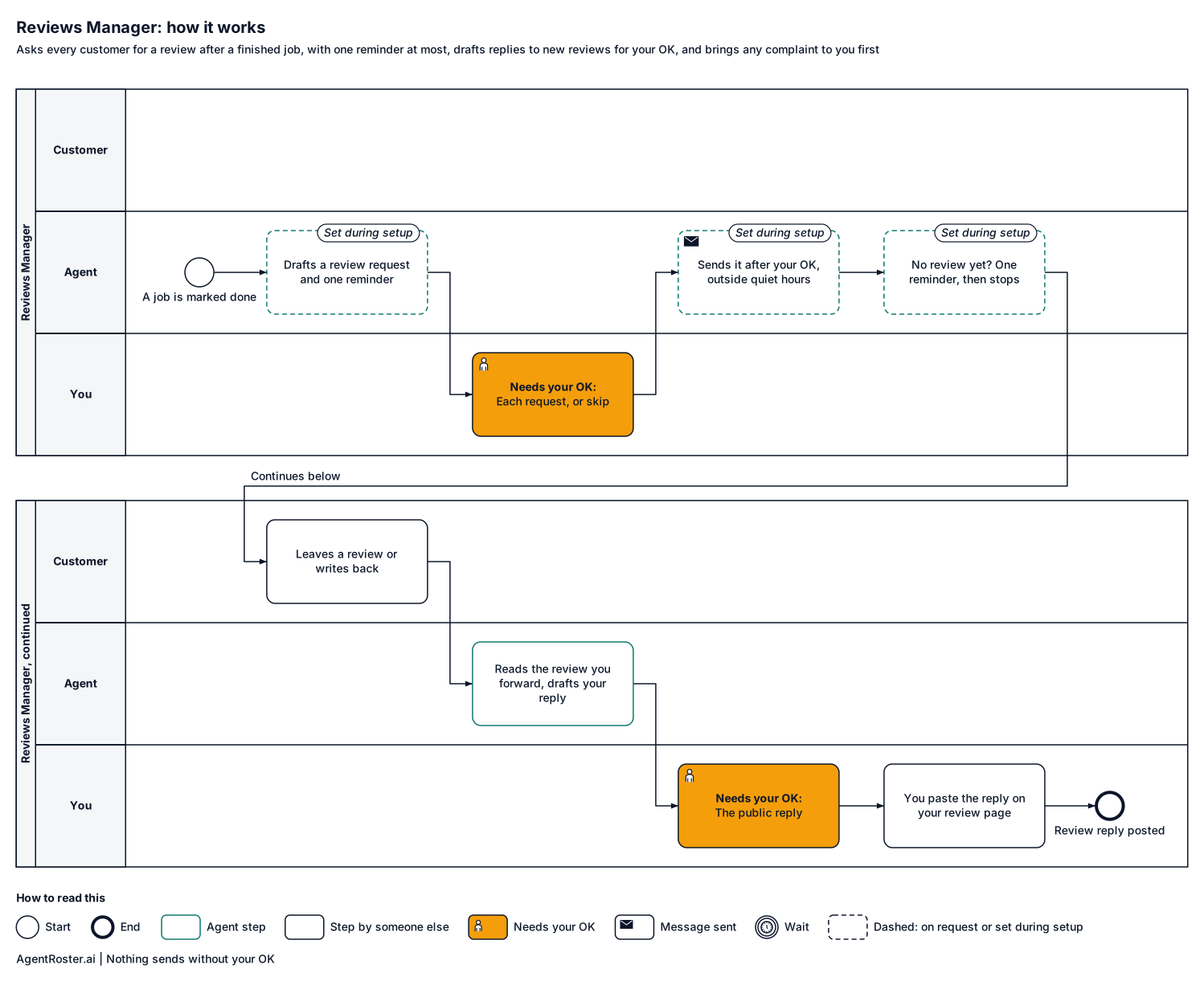
Every step, who does it, and where it waits for your OK. Nothing sends without your OK.
See the full workflow
How it works, step by stepTap to enlarge
Diagram of how the Reviews Manager works, step by step. 1, you: you or your team email 'job done Garcia'; 2, the agent: drafts the request at the time you chose (set during setup); 3, you: approve, edit or skip each request; 4, the agent: sends it after your OK, outside quiet hours (set during setup); 5, the agent: no reply? One reminder, then it stops (set during setup); 6, the customer: leaves a review or writes back; 7, the agent: reads the reply: happy or unhappy?; 8, the agent: drafts a reply to a review you forward; 9, you: approve or edit the public reply; 10, you: you paste the reply on your review page; 11, the agent: monthly note on new reviews (on request). Nothing sends without your OK.
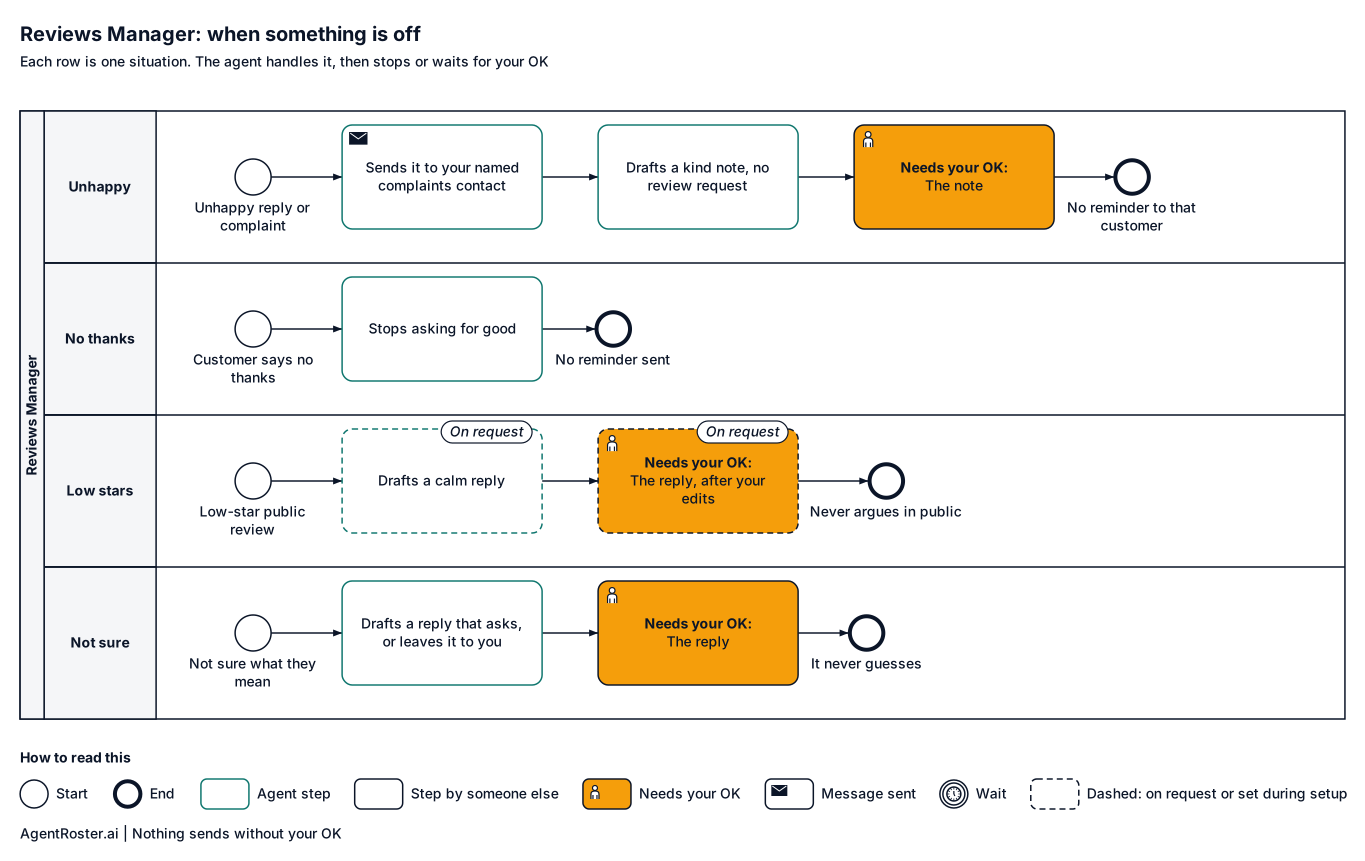
When something is offTap to enlarge
Diagram of what the Reviews Manager does when something is off. Unhappy reply or complaint: sends their message and your request to the person you named for complaints, and withdraws any review request or reminder to that customer. Customer says no thanks: stops every request and reminder to that customer for good. Low-star public review (on request): drafts a calm reply for you to edit and approve. It is not sure what the customer means: drafts a reply that asks, or leaves it to you.

What you'll provide

Everything it needs to do the job. You add it during setup.

Information

Facts about your business.

  • Links to your review pagesRequired

    So customers land in the right place.

    Takes about 5 minutes

  • A way to know a job is doneRequired

    You or your team email "job done" after each job, and that starts the request.

Access

Accounts it connects to.

  • Your business email (Gmail or Google Workspace)Required

    To send requests from your business.

    Takes about 5 minutes

  • A text line for requestsOn request

    Texting is on request today. If you want it, it gets its own line and you keep your number.

  • Google Business ProfileOn request

    Posting replies for you is on request. Until then, you paste the approved reply.

Decisions

Your rules. Email us a change any time and we make it.

  • How long after a job to askRequired

    For example, the next morning.

    Takes about 1 minute

  • Who handles complaintsRequired

    Every unhappy reply comes to you first. Name who follows up so the note says who will be in touch.

    Takes about 1 minute

You never send passwords by email or chat. You enter any login your roles need on a secure page we email you. It goes straight to your own private setup; we never see it. Each role gets its own work account, with its own email and calendar seat, or you invite it the way you'd invite a new employee. You can remove it any time. Texting is on request: if you add it, you keep your phone number and forward texts to its line.

After you hire

  1. 1Answer a few basic questions about how the job is done
  2. 2You add the items above during setup
  3. 3It starts in shadow mode: it drafts, you watch
  4. 4It goes live with your OK

Information

Provider
AgentRoster.AI
Category
Reputation
Plan
Included in every plan. Solo from $89/mo plus $99 setup. Extra roles $39/mo.
Setup
Answer a few basic questions about how the job is done. One-time setup fee $99 to $299 by plan.
Language
English
Works in
Email today; texting on request
Works with
Gmail
Approval
Nothing sends without your OK
Support
Email hello@agentroster.ai

Your data

  • Kept separate from every other customer's.
  • Never sold. Never used to train AI.
  • Stored in the United States.
  • Deleted within 30 days if you cancel.

Details in our privacy policy and provider list.

You might also hire

Questions

Will it bug my customers?

No. One request and at most one reminder, at the time you choose. If someone says no thanks, it stops.

What about a bad review?

It drafts a calm reply for you to edit and approve. It never argues in public. Its special care for low-star reviews is being tested, so read those drafts closely.

Will customers know it's AI?

Requests come from your business name. If someone asks, it says it's an AI assistant for your business.

Your next hire doesn't need a desk.

Founding rates for the first 50 businesses.