The Roster

Maintenance Coordinator

Repair requests, by urgency

Included in every plan. Solo from $89/mo plus $99 setup. Extra roles $39/mo.

Plan
Every plan
Setup
A few basic questions
Approval
Nothing sends without your OK
Works in
Email and web chat today; texting on request

See it at work

Examples. Names and numbers are made up.

Gets the details first
Sorted by urgency
Work orders wait for your OK (on request)
Tracks it to fixed (on request)

Gathers repair requests from email and your site's chat into one list, flags emergencies to your on-call people right away, and drafts each tenant reply for your OK. Work orders to vendors and tracking a job until it is fixed are on request.

more

What it handles

  • One list for requests from email and your site's repair chat; texts on request
  • Matching each request to the unit and tenant
  • Sorting by urgency, using your rules
  • Asking for photos and access times
  • Drafting tenant replies (work orders to vendors on request)
  • Tracking jobs until the tenant confirms the fix (on request)
  • Alerting your on-call person to emergencies

What waits for your OK

  • Every tenant reply and work order
  • Vendor quotes above your job limit
  • Anything about rent, a lease or a dispute

What it never does

  • Promise a price, date or time you haven't set
  • Spend your money or agree to a charge
  • Pretend to be a person. If asked, it says it's an AI assistant
  • Guess. When it isn't sure, it hands the question to you
  • Approve spending or give a visit time before the vendor confirms

How businesses use it

Property management company

Requests come by text, email and web form, and some get lost.

Puts every request in one list with the tenant's photos, matched to the unit from the rent roll you give us.

Landlord with a few buildings

Every repair takes three messages to learn which unit.

Gets the unit, a photo and an access time before it reaches you.

Real estate office with rentals

Maintenance pulls agents off deals.

Work orders to vendors and fixed-job follow-ups are on request.

How it works

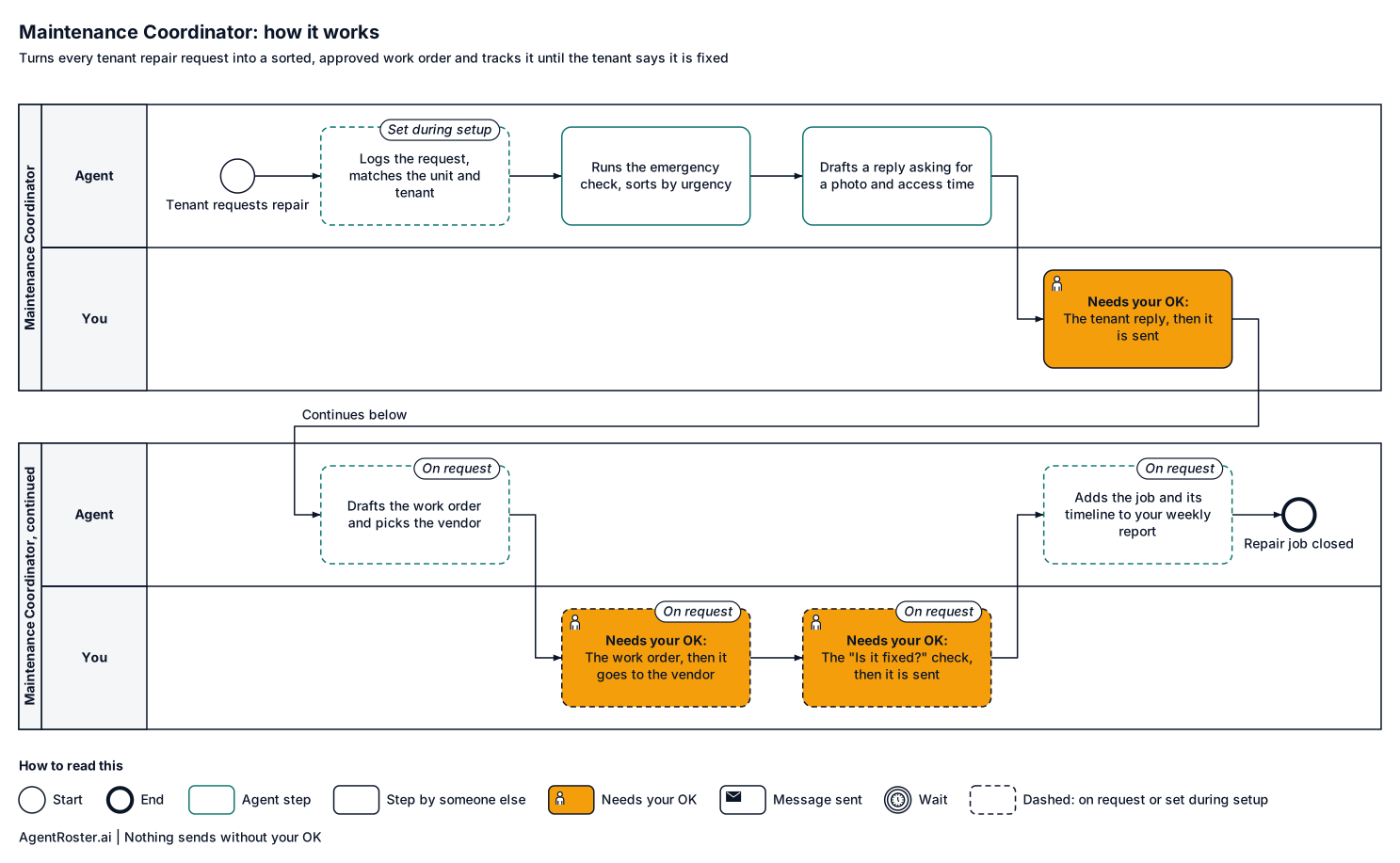
Every step, who does it, and where it waits for your OK. Nothing sends without your OK.
See the full workflow
How it works, step by stepTap to enlarge
Diagram of how the Maintenance Coordinator works, step by step. 1, the agent: puts the request in one list, words and time kept; 2, the agent: matches the sender to the unit and tenant (set during setup); 3, the agent: runs the emergency check, then sorts by urgency; 4, the agent: drafts a reply asking for a photo and access time; 5, you: tenant reply; 6, the customer: tenant gets the reply in the same thread; 7, the agent: drafts the work order and picks the vendor (on request); 8, you: work order and vendor (on request); 9, your tools: work order sent to the vendor with the job limit (on request); 10, you: the "Is it fixed?" check to the tenant; 11, the customer: tenant asked if it is fixed; a reply stops the asks (on request); 12, the agent: adds the job and its timeline to your weekly report (on request). Nothing sends without your OK.
When something is offTap to enlarge
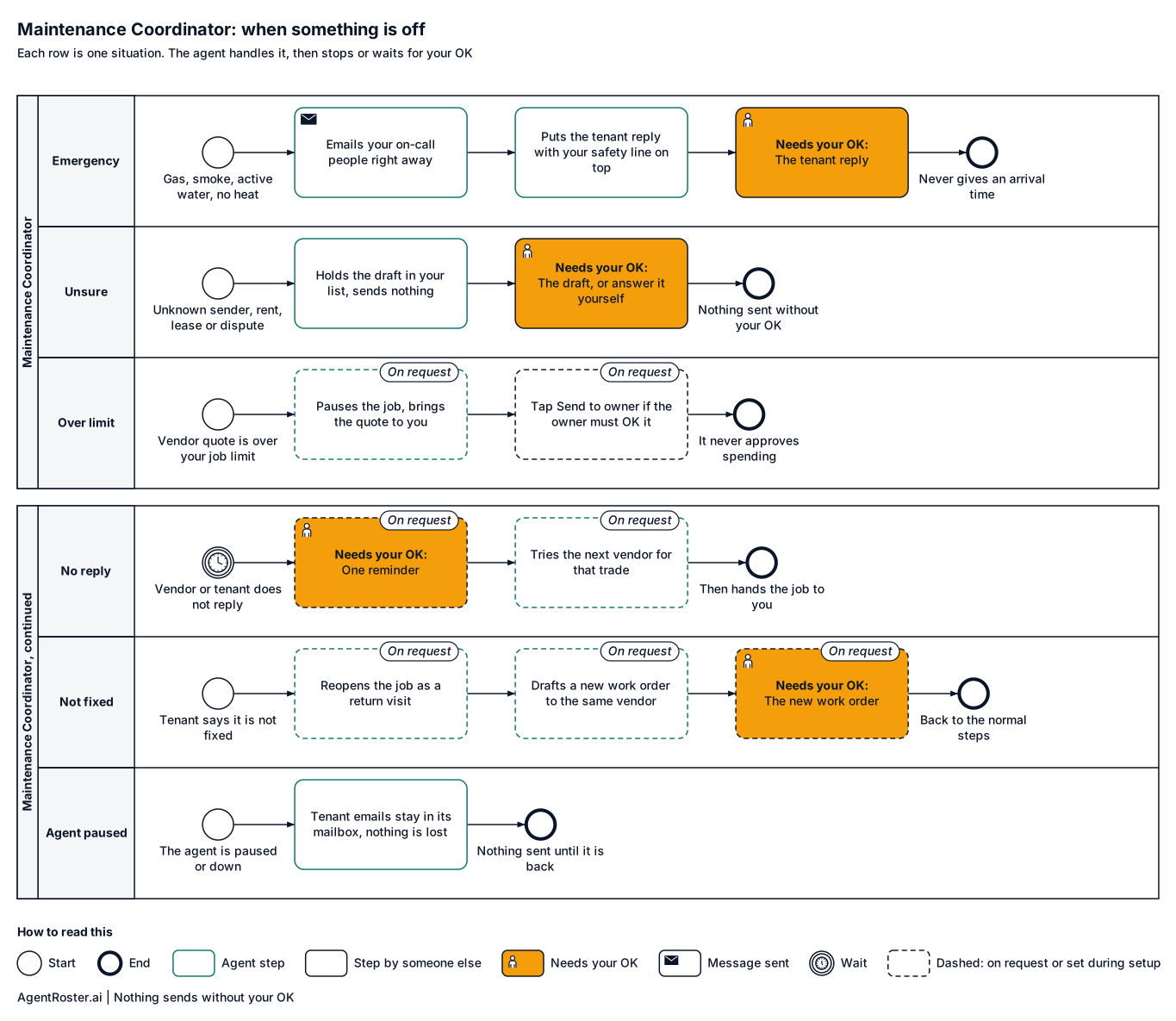
Diagram of what the Maintenance Coordinator does when something is off. Emergency: gas, smoke, active water, no heat in season: emails your on-call people right away with the tenant's email, the message and the unit if it matches your rent roll, no tap needed. Unsure: unknown sender, rent, lease, dispute: nothing is sent. Vendor quote is over your job limit (on request): pauses the job and brings the quote to you. Vendor or tenant does not reply (on request): sends one reminder after your OK, then tries the next vendor for that trade, then hands the job to you. Tenant says it is not fixed (on request): reopens the job as a return visit and drafts a new work order to the same vendor for your OK. Agent paused or down: tenant emails stay in the agent mailbox and in your own inbox if you copy it, so nothing is lost.

What you'll provide

Everything it needs to do the job. You add it during setup.

Information

Facts about your business.

  • Your rent roll: properties, units and tenantsRequired

    So each request is matched to the right unit. Today this fits a few buildings; larger rent rolls are on request.

    Takes about 15 minutes

  • Your vendors and what each one handlesRequired

    So each job goes to the right vendor.

    Takes about 15 minutes

  • Entry and access rulesOptional

    For example, notice needed before entering a unit.

    Takes about 5 minutes

Access

Accounts it connects to.

  • Your business email (Gmail or Google Workspace)Required

    Where tenant email goes. Work orders to vendors are on request.

    Takes about 5 minutes

  • A text line for tenantsOn request

    Texting is on request today. If you want it, it gets its own line and you keep your number.

  • Your property management softwareOn request

    Connecting your property software is on request.

Decisions

Your rules. Email us a change any time and we make it.

  • What counts as an emergency, and who's on callRequired

    Emergencies go to that person right away.

    Takes about 10 minutes

  • Your spending limit per jobRequired

    Vendor quotes above it come to you.

    Takes about 2 minutes

  • What always needs your OKRequired

    The default is every tenant reply.

    Takes about 2 minutes

You never send passwords by email or chat. You enter any login your roles need on a secure page we email you. It goes straight to your own private setup; we never see it. Each role gets its own work account, with its own email and calendar seat, or you invite it the way you'd invite a new employee. You can remove it any time. Texting is on request: if you add it, you keep your phone number and forward texts to its line.

After you hire

  1. 1Answer a few basic questions about how the job is done
  2. 2You add the items above during setup
  3. 3It starts in shadow mode: it drafts, you watch
  4. 4It goes live with your OK

Information

Provider
AgentRoster.AI
Category
Repairs
Plan
Included in every plan. Solo from $89/mo plus $99 setup. Extra roles $39/mo.
Setup
Answer a few basic questions about how the job is done. One-time setup fee $99 to $299 by plan.
Language
English
Works in
Email and web chat today; texting on request
Works with
Gmail
Approval
Nothing sends without your OK
Support
Email hello@agentroster.ai

Your data

  • Kept separate from every other customer's.
  • Never sold. Never used to train AI.
  • Stored in the United States.
  • Deleted within 30 days if you cancel.

Details in our privacy policy and provider list.

You might also hire

Questions

What happens with an emergency at 2 am?

If a request fits your emergency rules, like active water or no heat in winter, it emails your on-call people right away with the unit, the tenant and the message. A short reply telling the tenant help is being contacted waits at the top of your list for one tap. It never gives a time.

What if it picks the wrong vendor?

Work orders to vendors are on request. When they are on, every work order waits for your OK, so you see the vendor first. You add your vendor list during setup; to change it, email us.

Will tenants know it's AI?

It writes in your company's name and never claims to be a person. If a tenant asks, it says it's an AI assistant for your office.

Your next hire doesn't need a desk.

Founding rates for the first 50 businesses.