The Roster

Website Builder

Your website, by email

Included in every plan. Solo from $89/mo plus $99 setup. Extra roles $39/mo.

Plan
Every plan
Setup
A few basic questions
Approval
Nothing sends without your OK
Works in
Email today

See it at work

Examples. Names and numbers are made up.

Change it by email
Preview before it's live
New pages from one email
Undo in one email

Builds and updates your website from a plain email. Tell it what changed, look over the private preview on your phone, and tap Publish. Nothing goes live until you do, and it checks your live site after every change.

more

What it handles

  • A new website of simple, fast pages, or one that replaces the site you have
  • Pages for services, areas and your team
  • Hours, prices, menus and contact details
  • A page about a job you describe in an email (photos on request)
  • Contact and booking forms (on request)
  • Undo: your earlier version back with one email and one tap
  • A check of your live site after every change, with a fix ready if a page looks different

What waits for your OK

  • Every change, shown in a preview first
  • Any price you add or change
  • Removing a page
  • Putting a page back when it looks different after it's live
  • Wording about licenses, warranties or guarantees

What it never does

  • Promise a price, date or time you haven't set
  • Spend your money or agree to a charge
  • Pretend to be a person. If asked, it says it's an AI assistant
  • Guess. When it isn't sure, it hands the question to you
  • Buy a web address or any paid add-on for you

How businesses use it

Landscaping company

The site still shows last year's prices.

Updates prices and seasonal services from one email, with a preview before anything changes.

Law office

Practice area pages are thin or missing.

Drafts plain-language pages for each practice area, with every word approved by you.

Salon or clinic

Hours and services change. The website doesn't.

Keeps hours and services current, with a preview before each change. Booking buttons are on request.

How it works

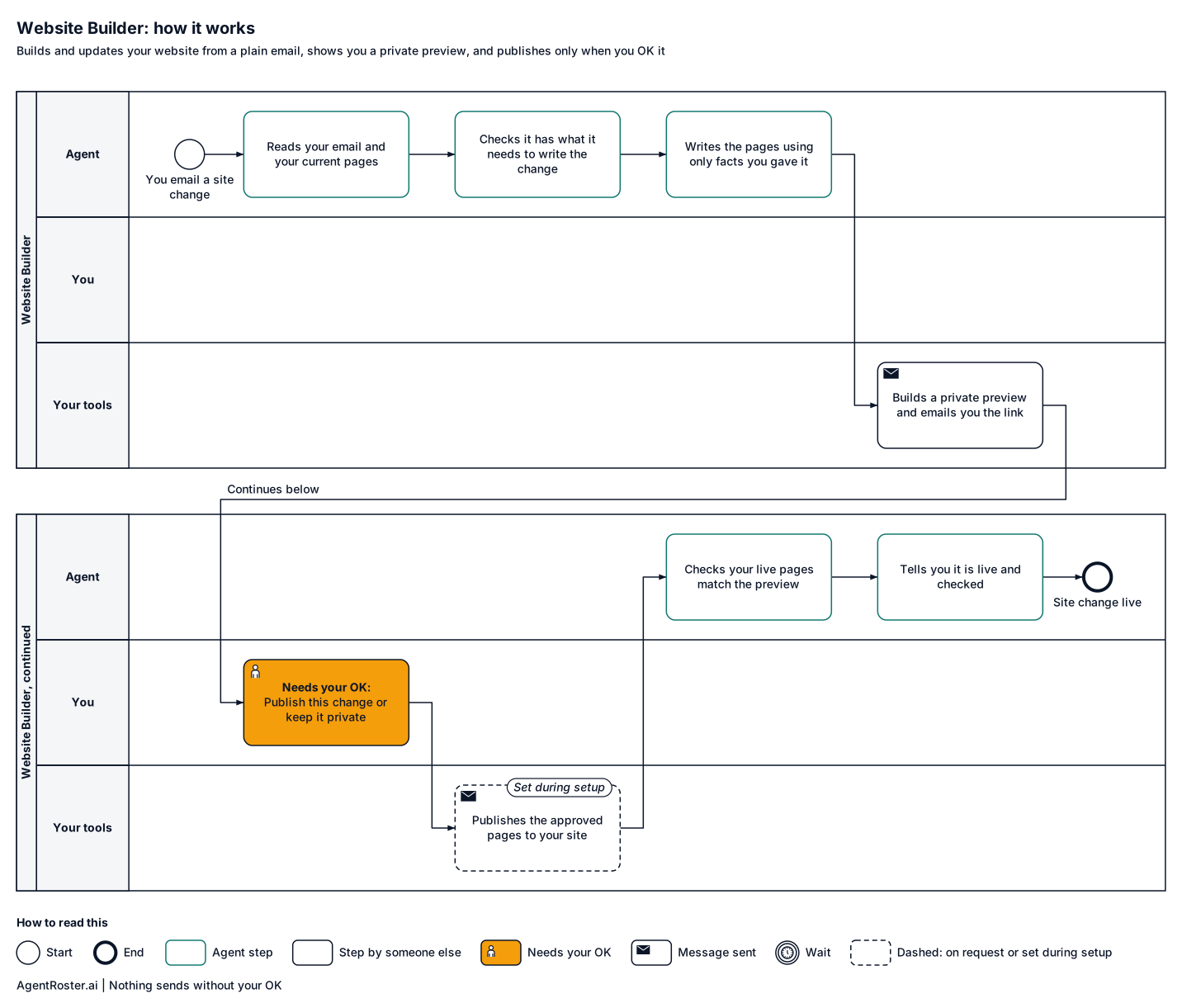
Every step, who does it, and where it waits for your OK. Nothing sends without your OK.
See the full workflow
How it works, step by stepTap to enlarge
Diagram of how the Website Builder works, step by step. 1, the agent: reads your email and your current pages; 2, the agent: has what it needs to write the change?; 3, the agent: writes the new pages from the facts you gave it; 4, the agent: checks every price, phone and email came from you; 5, your tools: builds a private preview of the changed pages; 6, your tools: preview link emailed to you; 7, you: publish this change, or keep it private; 8, your tools: publishes the approved pages to your site (set during setup); 9, the agent: checks the live pages match the preview; 10, the agent: tells you it is live and checked, and logs it. Nothing sends without your OK.
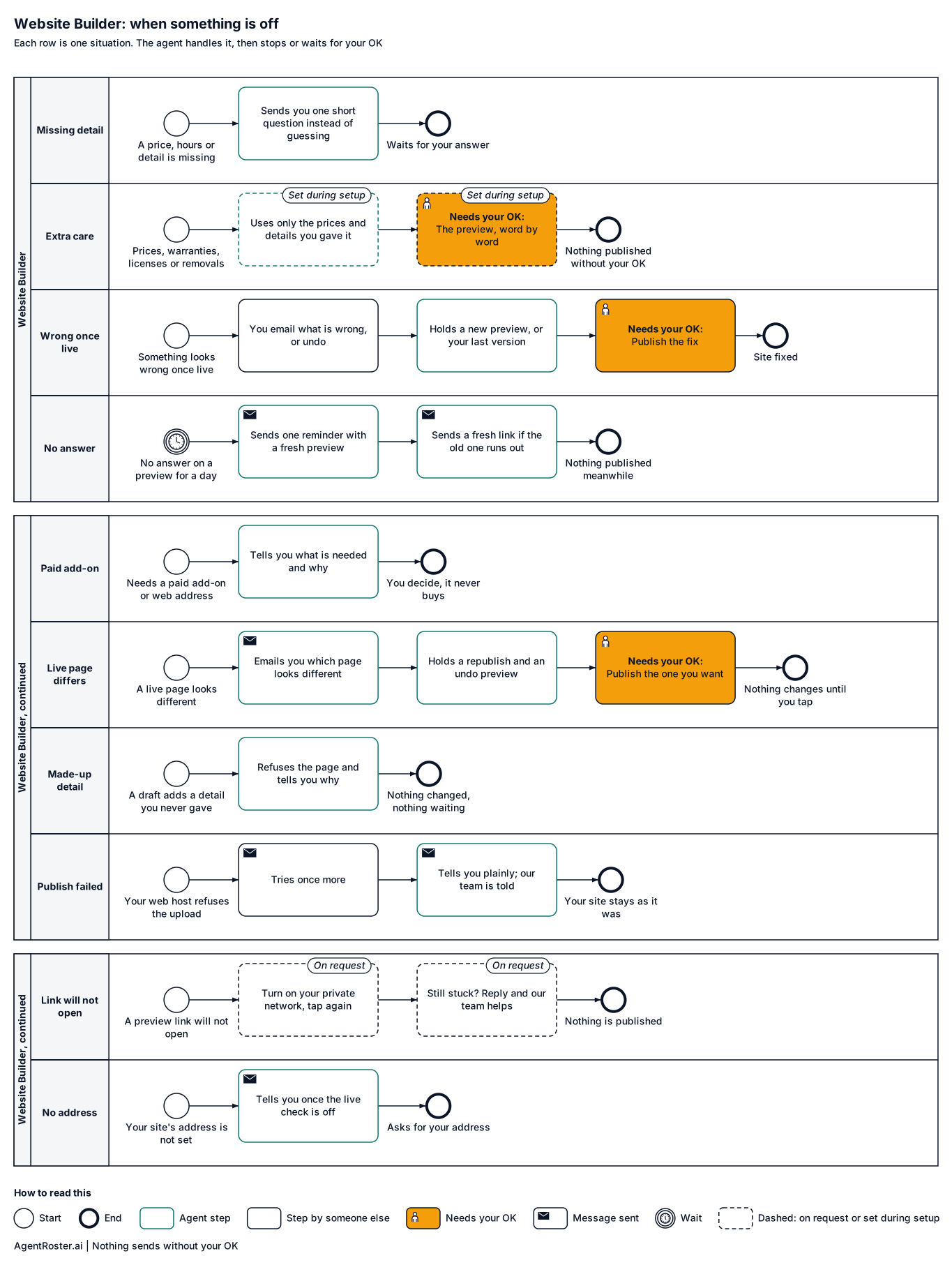
When something is offTap to enlarge
Diagram of what the Website Builder does when something is off. Missing a price, hours or detail: sends you one short question straight away instead of guessing. Prices, warranties, licenses or removing a page (set during setup): uses only the prices and details you gave it and refuses any price, phone or email it cannot find in your facts. Something looks wrong after it is live: you email what is wrong, or 'undo'. You have not answered a preview: sends you one reminder after a day with a fresh preview, and a fresh link if the old one runs out. A change needs a paid add-on or new web address: never buys it. A live page looks different from the preview: emails you which page looks different, with two fresh previews: put the approved pages back, or go back to the earlier website. A draft keeps adding a detail you never gave: refuses the page and tells you nothing was changed and nothing is waiting for your OK. Your web host refuses the upload: tries once more. A preview link will not open on your phone (on request): nothing is published. Your site's public address is not set: after the first publish it tells you once that the live check is off and asks for the address.

What you'll provide

Everything it needs to do the job. You add it during setup.

Information

Facts about your business.

  • Your logo and a few photosOn request

    Pages are text only today. Photos and logo are on request.

  • Your services, areas and the prices to postRequired

    The core of every page.

    Takes about 15 minutes

  • Your website's addressRequired

    So it can check your live pages after every change.

    Takes about 1 minute

  • Two or three websites you likeOptional

    So we match the look you want.

    Takes about 5 minutes

Access

Accounts it connects to.

  • Your web host loginRequired, entered on a secure page

    The login your web host gave you for uploading files. You enter it yourself on a secure page we email you.

    Takes about 10 minutes

  • Your web address accountOptional

    So your web address points at the new pages. You add it during setup.

  • Your phone on your private networkRequired

    So preview links open on your phone. You add it during setup.

    Takes about 5 minutes

Decisions

Your rules. Email us a change any time and we make it.

  • Who approves changesRequired

    Previews go to the owner's email. Nothing goes live without that OK.

    Takes about 1 minute

  • Wording that needs extra careOptional

    For example, warranties or license numbers.

You never send passwords by email or chat. You enter any login your roles need on a secure page we email you. It goes straight to your own private setup; we never see it. Each role gets its own work account, with its own email and calendar seat, or you invite it the way you'd invite a new employee. You can remove it any time.

After you hire

  1. 1Answer a few basic questions about how the job is done
  2. 2You add the items above during setup
  3. 3It starts in shadow mode: it drafts, you watch
  4. 4It goes live with your OK

Information

Provider
AgentRoster.AI
Category
Website
Plan
Included in every plan. Solo from $89/mo plus $99 setup. Extra roles $39/mo.
Setup
Answer a few basic questions about how the job is done. One-time setup fee $99 to $299 by plan.
Language
English
Works in
Email today
Works with
Your website
Approval
Nothing sends without your OK
Support
Email hello@agentroster.ai

Your data

  • Kept separate from every other customer's.
  • Never sold. Never used to train AI.
  • Stored in the United States.
  • Deleted within 30 days if you cancel.

Details in our privacy policy and provider list.

You might also hire

Questions

Do I have to give up my current website?

It builds simple, fast pages that replace your current site on your own web host. It does not edit a WordPress or other site-builder site. During setup you tell us about your current site, and we tell you plainly whether that fits.

Will it look like a cheap template?

Pages are clean and simple, made to read well on a phone. You see every page before it goes live and can email changes until you like it. Photos and custom styling are on request.

What if something looks wrong after it's live?

It checks every page on your live site after each change and emails you 'Website live and checked'. If a page looks different, it tells you which one and sends a preview to put it back, or your earlier version. You can also email what is wrong, or say undo. Nothing changes until you tap Publish.

How does it get onto my site?

During setup you enter your web host login yourself on a secure page we email you, and you tell us where your web address points. After that, every Publish tap puts the change on your site, and it checks the live pages for you.

How do I give you my web host login?

You don't give it to us. We email you a link to a secure page that works once. It shows only the logins your roles need. For the Website Builder, that is the login your web host gave you for uploading files. You type it in and press Check and save. Your browser locks it before it leaves your screen, and only your own private setup can unlock it. We never see it, and it is never read out on a call. The page checks the login right away. You see "Connected", or a plain note on what to fix, such as a wrong password or folder name. The link stops working once you use it, and it expires after a day. Need to change or remove a login later? Reply "new login link" to your agent's email and we send you a fresh one.

What if I don't answer a preview?

Nothing goes live. You get one reminder after a day with a fresh preview, and a fresh link if the old one runs out.

Could it put a wrong phone number or price on my site?

No. Every page is checked against the details you gave it. If a draft keeps adding a phone number, email or price you never gave, it refuses the page, tells you, and your site stays as it was.

Your next hire doesn't need a desk.

Founding rates for the first 50 businesses.